# GLPN
これは最近導入されたモデルのため、APIは十分にテストされていません。将来、修正のためにいくつかのバグや軽微な破壊的変更が発生する可能性があります。不審な点が見つかった場合は、[Github Issue](https://github.com/huggingface/transformers/issues/new?assignees=&labels=&template=bug-report.md&title)を起票してください。
## 概要
GLPNモデルは、Doyeon Kim、Woonghyun Ga、Pyungwhan Ahn、Donggyu Joo、Sehwan Chun、Junmo Kim によって [Global-Local Path Networks for Monocular Depth Estimation with Vertical CutDepth](https://huggingface.co/papers/2201.07436) で提案されました。GLPNは、[SegFormer](segformer) の階層型ミックスTransformerと軽量なデコーダーを組み合わせ、単眼深度推定を行います。提案されたデコーダーは、従来のデコーダーよりも優れた性能を示すとともに、計算複雑さを大幅に低減しています。
論文の抄録は以下の通りです。
*単一画像からの深度推定は、コンピュータビジョンのさまざまな分野に適用できる重要なタスクであり、畳み込みニューラルネットワークの発展に伴い急速に成長してきました。本論文では、ネットワークの予測精度をさらに向上させるために、単眼深度推定のための新しい構造と学習戦略を提案します。階層型トランスフォーマーエンコーダーを配置してグローバルなコンテキストを捕捉・伝達し、局所的な接続性を考慮しながら推定深度マップを生成する、軽量かつ強力なデコーダーを設計します。提案する選択的機能融合モジュールを用いて、マルチスケールの局所特徴とグローバルなデコーディングストリーム間の接続パスを構築することで、ネットワークは両方の表現を統合し、細部のディテールを復元できます。さらに、提案するデコーダーは、計算複雑さが大幅に少ないにもかかわらず、以前に提案されたデコーダーよりも優れた性能を示します。また、深度推定における重要な観察結果を活用して深度固有の拡張方法を改善し、モデルを強化しました。当社のネットワークは、困難な深度データセットであるNYU Depth V2において、最先端の性能を達成しています。提案手法の有効性を検証・示すために、広範な実験が行われました。最後に、当社のモデルは、他の比較対象モデルよりも優れた汎化能力と頑健性を示しています。*
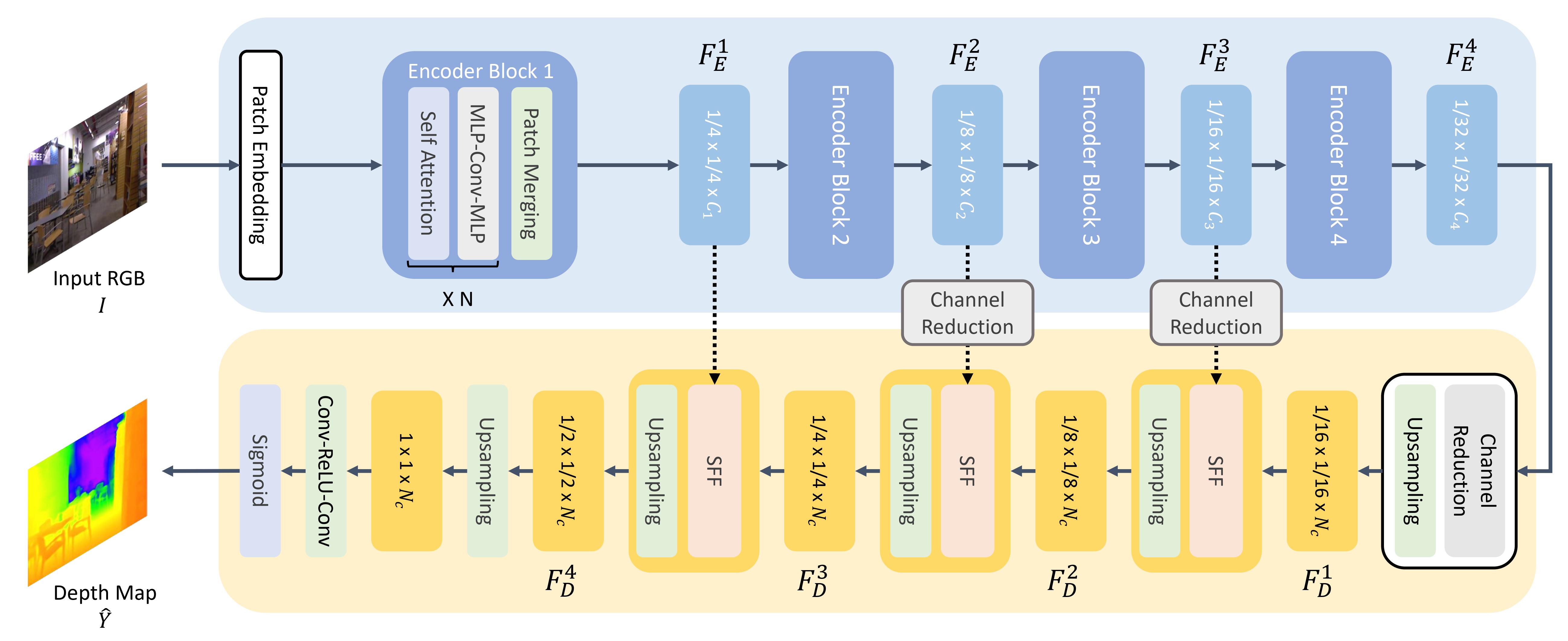 アプローチの概要。元の論文から引用。
このモデルは [nielsr](https://huggingface.co/nielsr) によって提供されました。元のコードは [こちら](https://github.com/vinvino02/GLPDepth) で確認できます。
## リソース
GLPNの入門を支援するための、Hugging Face公式およびコミュニティ(🌎で示されます)のリソースのリストです。
- [GLPNForDepthEstimation](/docs/transformers/main/ja/model_doc/glpn#transformers.GLPNForDepthEstimation)のデモノートブックは、[こちら](https://github.com/NielsRogge/Transformers-Tutorials/tree/master/GLPN)で確認できます。
- [単眼深度推定タスクガイド](../tasks/monocular_depth_estimation)
## GLPNConfig[[transformers.GLPNConfig]]
#### transformers.GLPNConfig[[transformers.GLPNConfig]]
```python
transformers.GLPNConfig(transformers_version: str | None = None, architectures: list[str] | None = None, output_hidden_states: bool | None = False, return_dict: bool | None = True, dtype: str | torch.dtype | None = None, chunk_size_feed_forward: int = 0, is_encoder_decoder: bool = False, id2label: dict[int, str] | dict[str, str] | None = None, label2id: dict[str, int] | dict[str, str] | None = None, problem_type: Literal['regression', 'single_label_classification', 'multi_label_classification'] | None = None, num_channels: int = 3, num_encoder_blocks: int = 4, depths: list[int] | tuple[int, ...] = (2, 2, 2, 2), sr_ratios: list[int] | tuple[int, ...] = (8, 4, 2, 1), hidden_sizes: list[int] | tuple[int, ...] = (32, 64, 160, 256), patch_sizes: list[int] | tuple[int, ...] = (7, 3, 3, 3), strides: list[int] | tuple[int, ...] = (4, 2, 2, 2), num_attention_heads: list[int] | tuple[int, ...] = (1, 2, 5, 8), mlp_ratios: list[int] | tuple[int, ...] = (4, 4, 4, 4), hidden_act: str = 'gelu', hidden_dropout_prob: float | int = 0.0, attention_probs_dropout_prob: float | int = 0.0, initializer_range: float = 0.02, drop_path_rate: float | int = 0.1, layer_norm_eps: float = 1e-06, decoder_hidden_size: int = 64, max_depth: int = 10, head_in_index: int = -1)
```
[ソース](https://github.com/huggingface/transformers/blob/main/src/transformers/models/glpn/configuration_glpn.py#L24)
**パラメータ:**
num_channels (`int`、*任意*、デフォルトは`3`) : 入力チャネル数。
num_encoder_blocks (`int`、*optional*、デフォルトは 4) : エンコーダーブロックの数(つまり、Mix Transformer エンコーダーのステージ数)。
depths (`list[int]`、*任意*、デフォルトは`[2, 2, 2, 2]`) : 各エンコーダーブロックの層数です。
sr_ratios (`list[int]`、*任意*、デフォルトは`[8, 4, 2, 1]`) : 各エンコーダーブロックにおけるシーケンスの削減率。
hidden_sizes (`Union[list[int], tuple[int, ...]]`、*任意*、デフォルトは`(32, 64, 160, 256)`) : モデルの各ステージにおける次元数(隠れ層サイズ)。
patch_sizes (`list[int]`、*任意*、デフォルトは `[7, 3, 3, 3]`) : 各エンコーダーブロックの前のパッチサイズ。
strides (`list[int]`、*任意*、デフォルトは`[4, 2, 2, 2]`) : エンコーダーブロックごとのストライド。
num_attention_heads (`list[int]`、*任意*、デフォルトは `[1, 2, 5, 8]`) : Transformer エンコーダーの各ブロックにおける、各アテンション層のアテンションヘッド数。
mlp_ratios (`list[int]`、*optional*、デフォルトは`[4, 4, 4, 4]`) : エンコーダーブロック内の Mix FFN において、入力層のサイズに対する隠れ層のサイズの比率。
hidden_act (`str`、*任意*、デフォルトは`gelu`) : デコーダーで使用する非線形活性化関数(関数または文字列)。例えば、`"gelu"`、`"relu"`、`"silu"`など。
hidden_dropout_prob (`Union[float, int]`、*任意*、デフォルトは`0.0`) : embeddings、encoder、pooler 内のすべての全結合層における dropout 確率。
attention_probs_dropout_prob (`Union[float, int]`、*任意*、デフォルトは`0.0`) : 注意確率のドロップアウト率。
initializer_range (`float`、*任意*、デフォルトは`0.02`) : すべての重み行列を初期化するためのtruncated_normal_initializerの標準偏差です。
drop_path_rate (`Union[float, int]`、*任意*、デフォルトは`0.1`) : パッチ融合のドロップパス率。
layer_norm_eps (`float`、*任意*、デフォルトは`1e-06`) : Layer Normalization 層で使用する epsilon です。
decoder_hidden_size (`int`、*任意*、デフォルトは 64) : デコーダーの次元数。
max_depth (`int`、*任意*、デフォルトは 10) : デコーダーの最大深度です。
head_in_index (`int`、*任意*、デフォルトは -1) : ヘッドで使用される特徴量のインデックス。
これは GLPNModel の設定を保存するための設定クラスです。指定された引数に基づいて Glpn モデルをインスタンス化し、モデルのアーキテクチャを定義するために使用されます。デフォルト値で設定をインスタンス化すると、[vinvino02/glpn-kitti](https://huggingface.co/vinvino02/glpn-kitti) と同様の設定が得られます。
設定オブジェクトは [PreTrainedConfig](/docs/transformers/main/ja/main_classes/configuration#transformers.PreTrainedConfig) を継承し、モデルの出力を制御するために使用できます。詳細については、[PreTrainedConfig](/docs/transformers/main/ja/main_classes/configuration#transformers.PreTrainedConfig) のドキュメントを参照してください。
例:
```python
>>> from transformers import GLPNModel, GLPNConfig
>>> # Initializing a GLPN vinvino02/glpn-kitti style configuration
>>> configuration = GLPNConfig()
>>> # Initializing a model from the vinvino02/glpn-kitti style configuration
>>> model = GLPNModel(configuration)
>>> # Accessing the model configuration
>>> configuration = model.config
```
## GLPNImageProcessor[[transformers.GLPNImageProcessor]]
#### transformers.GLPNImageProcessor[[transformers.GLPNImageProcessor]]
```python
transformers.GLPNImageProcessor(**kwargs: *)
```
[ソース](https://github.com/huggingface/transformers/blob/main/src/transformers/models/glpn/image_processing_glpn.py#L51)
**パラメータ:**
do_convert_rgb (`bool`, *kwargs*, *optional*) : 画像を RGB に変換するかどうか。
do_resize (`bool`, *kwargs*, *任意*, デフォルトは `True`) : 画像をリサイズするかどうか。
size (`Annotated[int | list[int] | tuple[int, ...] | dict[str, int] | None, None]`, *kwargs*) : モデルへの最大入力次元を記述します。
default_to_square (`bool`, *kwargs*, *任意*、デフォルトは `True`) : size が整数の場合、リサイズ時に正方形の画像をデフォルトとするかどうか。
crop_size (`Annotated[int | list[int] | tuple[int, ...] | dict[str, int] | None, None]`, *kwargs*) : `center_crop` を適用した後の出力画像のサイズ。
resample (`Annotated[Union[int, PILImageResampling, NoneType], None]`, *kwargs*、デフォルト値は`2`) : 画像のリサイズ時に使用するリサンプリングフィルタです。これは列挙型`PILImageResampling`のいずれかになります。`do_resize`が`True`に設定されている場合のみ、効果が現れます。
do_rescale (`bool`, *kwargs*, *optional*, デフォルトは `True`) : 画像をリスケールするかどうか。
rescale_factor (`float`, *kwargs*, *optional*, デフォルトは `0.00392156862745098`) : `do_rescale` が `True` に設定されている場合、画像をリスケールするための係数。
do_normalize (`bool`, *kwargs*, *optional*) : 画像を正規化するかどうかを指定します。
image_mean (`Union[float, list[float], tuple[float, ...]]`, *kwargs*, *optional*) : 正規化に使用する画像の平均値。`do_normalize` が `True` に設定されている場合のみ有効です。
image_std (`Union[float, list[float], tuple[float, ...]]`, *kwargs*, *optional*) : 正規化に使用する画像の標準偏差。`do_normalize` が `True` に設定されている場合のみ有効です。
do_pad (`bool`, *kwargs*, *任意*) : 画像にパディングを適用するかどうか。パディングは、バッチ内の最大サイズに合わせるか、画像ごとに固定の正方形サイズに合わせるかのいずれかで行われます。正確なパディング戦略はモデルによって異なります。
pad_size (`Annotated[int | list[int] | tuple[int, ...] | dict[str, int] | None, None]`, *kwargs*) : 画像をパディングするサイズを`{"height": int, "width" int}`で指定します。前処理に提供されたすべての画像サイズより大きい必要があります。`pad_size`が指定されない場合、バッチ内の最大の幅と高さにパディングされます。`do_pad=True.`の場合にのみ適用されます。
do_center_crop (`bool`, *kwargs*, *optional*) : 画像を中央クロップするかどうか。
data_format (`Union[str, ~image_utils.ChannelDimension]`、*kwargs*、*optional*) : 対応するのは `ChannelDimension.FIRST` のみです。slow processors との互換性のために追加されました。
input_data_format (`Union[str, ~image_utils.ChannelDimension]`, *kwargs*, *任意*) : 入力画像のチャネル次元の形式です。設定されていない場合、入力画像からチャネル次元の形式が推論されます。以下のいずれかになります: - `"channels_first"` または `ChannelDimension.FIRST`: (num_channels, height, width) 形式の画像。 - `"channels_last"` または `ChannelDimension.LAST`: (height, width, num_channels) 形式の画像。 - `"none"` または `ChannelDimension.NONE`: (height, width) 形式の画像。
device (`Annotated[Union[str, torch.device, NoneType], None]`, *kwargs*) : 動画を処理するデバイスです。未設定の場合、入力動画からデバイスが推論されます。
return_tensors (`Annotated[str | ~utils.generic.TensorType | None, None]`, *kwargs*) : `'pt'`に設定されている場合はスタックされたテンソルを返し、それ以外の場合はテンソルのリストを返します。
disable_grouping (`bool`, *kwargs*, *optional*) : 画像をサイズごとにグループ化してバッチ処理するのではなく、個別に処理するためにグループ化を無効にするかどうかを指定します。None の場合、画像が CPU にある場合は True、それ以外の場合は False に設定されます。この選択は、https://github.com/huggingface/transformers/pull/38157 に詳しく記載されている実証的な観察に基づいています。
image_seq_length (`int`, *kwargs*, *任意*) : 入力内の各画像に使用される画像トークンの数です。後方互換性のために追加されましたが、将来のモデルではプロセッサの属性として設定されるべきです。
size_divisor (`int`, *kwargs*, *optional*, デフォルトは 32) : `do_resize` が `True` の場合、画像は、高さおよび幅が `size_divisor` の最も近い倍数に切り捨てられるようにリサイズされます。
GLPNImageProcessor 画像プロセッサを構築します。
#### preprocess[[transformers.GLPNImageProcessor.preprocess]]
```python
preprocess(images: typing.Union[ForwardRef('PIL.Image.Image'), numpy.ndarray, ForwardRef('torch.Tensor'), list['PIL.Image.Image'], list[numpy.ndarray], list['torch.Tensor']], **kwargs: *)
```
[ソース](https://github.com/huggingface/transformers/blob/main/src/transformers/models/glpn/image_processing_glpn.py#L70)
**パラメータ:**
images (`Union[PIL.Image.Image, numpy.ndarray, torch.Tensor, list[PIL.Image.Image], list[numpy.ndarray], list[torch.Tensor]]`) : 前処理対象の画像。ピクセル値が 0 から 255 の範囲にある単一の画像またはバッチの画像を想定しています。ピクセル値が 0 から 1 の範囲にある画像を渡す場合は、`do_rescale=False` を設定してください。
do_convert_rgb (`bool`, *kwargs*, *optional*) : 画像を RGB に変換するかどうか。
do_resize (`bool`, *kwargs*, *optional*) : 画像をリサイズするかどうか。
size (`Annotated[int | list[int] | tuple[int, ...] | dict[str, int] | None, None]`, *kwargs*) : モデルへの最大入力次元を記述します。
default_to_square (`bool`, *kwargs*, *optional*) : size が int の場合、リサイズ時に正方形の画像をデフォルトとするかどうか。
crop_size (`Annotated[int | list[int] | tuple[int, ...] | dict[str, int] | None, None]`, *kwargs*) : `center_crop` を適用した後の出力画像のサイズ。
resample (`Annotated[Union[int, PILImageResampling, NoneType], None]`, *kwargs*) : 画像をリサイズする場合に使用するリサンプリングフィルタ。`PILImageResampling` の列挙型のいずれかです。`do_resize` が `True` に設定されている場合のみ有効です。
do_rescale (`bool`, *kwargs*, *任意*) : 画像をリスケールするかどうか。
rescale_factor (`float`, *kwargs*, *optional*) : `do_rescale` が `True` に設定されている場合、画像をリサイズするためのリスケール係数。
do_normalize (`bool`, *kwargs*, *optional*) : 画像を正規化するかどうかを指定します。
image_mean (`Union[float, list[float], tuple[float, ...]]`, *kwargs*, *optional*) : 正規化に使用する画像の平均値。`do_normalize` が `True` に設定されている場合のみ有効です。
image_std (`Union[float, list[float], tuple[float, ...]]`, *kwargs*, *optional*) : 正規化に使用する画像の標準偏差。`do_normalize` が `True` に設定されている場合のみ有効です。
do_pad (`bool`, *kwargs*, *任意*) : 画像にパディングを適用するかどうか。パディングは、バッチ内の最大サイズに合わせるか、画像ごとに固定の正方形サイズに合わせるかのいずれかで行われます。正確なパディング戦略はモデルによって異なります。
pad_size (`Annotated[int | list[int] | tuple[int, ...] | dict[str, int] | None, None]`, *kwargs*) : 画像をパディングするサイズを`{"height": int, "width" int}`で指定します。前処理に提供されたすべての画像サイズより大きい必要があります。`pad_size`が指定されない場合、バッチ内の最大の幅と高さにパディングされます。`do_pad=True.`の場合にのみ適用されます。
do_center_crop (`bool`, *kwargs*, *optional*) : 画像を中央クロップするかどうか。
data_format (`Union[str, ~image_utils.ChannelDimension]`、*kwargs*、*optional*) : 対応するのは `ChannelDimension.FIRST` のみです。slow processors との互換性のために追加されました。
input_data_format (`Union[str, ~image_utils.ChannelDimension]`, *kwargs*, *任意*) : 入力画像のチャネル次元の形式です。設定されていない場合、入力画像からチャネル次元の形式が推論されます。以下のいずれかになります: - `"channels_first"` または `ChannelDimension.FIRST`: (num_channels, height, width) 形式の画像。 - `"channels_last"` または `ChannelDimension.LAST`: (height, width, num_channels) 形式の画像。 - `"none"` または `ChannelDimension.NONE`: (height, width) 形式の画像。
device (`Annotated[Union[str, torch.device, NoneType], None]`, *kwargs*) : 動画を処理するデバイスです。未設定の場合、入力動画からデバイスが推論されます。
return_tensors (`Annotated[str | ~utils.generic.TensorType | None, None]`, *kwargs*) : `'pt'`に設定されている場合はスタックされたテンソルを返し、それ以外の場合はテンソルのリストを返します。
disable_grouping (`bool`, *kwargs*, *optional*) : 画像をサイズごとにグループ化してバッチ処理するのではなく、個別に処理するためにグループ化を無効にするかどうかを指定します。None の場合、画像が CPU にある場合は True、それ以外の場合は False に設定されます。この選択は、https://github.com/huggingface/transformers/pull/38157 に詳しく記載されている実証的な観察に基づいています。
image_seq_length (`int`, *kwargs*, *任意*) : 入力内の各画像に使用される画像トークンの数です。後方互換性のために追加されましたが、将来のモデルではプロセッサの属性として設定されるべきです。
size_divisor (`int`, *kwargs*, *optional*, デフォルトは 32) : `do_resize` が `True` の場合、画像は、高さおよび幅が `size_divisor` の最も近い倍数に切り捨てられるようにリサイズされます。
**戻り値:** `~image_processing_base.BatchFeature`
- **data** (`dict`) -- __call__ メソッドによって返されるリスト/配列/テンソルの辞書('pixel_values' など)。
- **tensor_type** (`Union[None, str, TensorType]`、*省略可*) -- 初期化時に PyTorch/Numpy の Tensor 内の整数リストを変換するために、ここで tensor_type を指定できます。
## GLPNImageProcessorPil[[transformers.GLPNImageProcessorPil]]
#### transformers.GLPNImageProcessorPil[[transformers.GLPNImageProcessorPil]]
```python
transformers.GLPNImageProcessorPil(**kwargs: *)
```
[ソース](https://github.com/huggingface/transformers/blob/main/src/transformers/models/glpn/image_processing_pil_glpn.py#L46)
**パラメータ:**
do_convert_rgb (`bool`, *kwargs*, *optional*) : 画像を RGB に変換するかどうか。
do_resize (`bool`, *kwargs*, *任意*, デフォルトは `True`) : 画像をリサイズするかどうか。
size (`Annotated[int | list[int] | tuple[int, ...] | dict[str, int] | None, None]`, *kwargs*) : モデルへの最大入力次元を記述します。
default_to_square (`bool`, *kwargs*, *任意*、デフォルトは `True`) : size が整数の場合、リサイズ時に正方形の画像をデフォルトとするかどうか。
crop_size (`Annotated[int | list[int] | tuple[int, ...] | dict[str, int] | None, None]`, *kwargs*) : `center_crop` を適用した後の出力画像のサイズ。
resample (`Annotated[Union[int, PILImageResampling, NoneType], None]`, *kwargs*、デフォルト値は`2`) : 画像のリサイズ時に使用するリサンプリングフィルタです。これは列挙型`PILImageResampling`のいずれかになります。`do_resize`が`True`に設定されている場合のみ、効果が現れます。
do_rescale (`bool`, *kwargs*, *optional*, デフォルトは `True`) : 画像をリスケールするかどうか。
rescale_factor (`float`, *kwargs*, *optional*, デフォルトは `0.00392156862745098`) : `do_rescale` が `True` に設定されている場合、画像をリスケールするための係数。
do_normalize (`bool`, *kwargs*, *optional*) : 画像を正規化するかどうかを指定します。
image_mean (`Union[float, list[float], tuple[float, ...]]`, *kwargs*, *optional*) : 正規化に使用する画像の平均値。`do_normalize` が `True` に設定されている場合のみ有効です。
image_std (`Union[float, list[float], tuple[float, ...]]`, *kwargs*, *optional*) : 正規化に使用する画像の標準偏差。`do_normalize` が `True` に設定されている場合のみ有効です。
do_pad (`bool`, *kwargs*, *任意*) : 画像にパディングを適用するかどうか。パディングは、バッチ内の最大サイズに合わせるか、画像ごとに固定の正方形サイズに合わせるかのいずれかで行われます。正確なパディング戦略はモデルによって異なります。
pad_size (`Annotated[int | list[int] | tuple[int, ...] | dict[str, int] | None, None]`, *kwargs*) : 画像をパディングするサイズを`{"height": int, "width" int}`で指定します。前処理に提供されたすべての画像サイズより大きい必要があります。`pad_size`が指定されない場合、バッチ内の最大の幅と高さにパディングされます。`do_pad=True.`の場合にのみ適用されます。
do_center_crop (`bool`, *kwargs*, *optional*) : 画像を中央クロップするかどうか。
data_format (`Union[str, ~image_utils.ChannelDimension]`、*kwargs*、*optional*) : 対応するのは `ChannelDimension.FIRST` のみです。slow processors との互換性のために追加されました。
input_data_format (`Union[str, ~image_utils.ChannelDimension]`, *kwargs*, *任意*) : 入力画像のチャネル次元の形式です。設定されていない場合、入力画像からチャネル次元の形式が推論されます。以下のいずれかになります: - `"channels_first"` または `ChannelDimension.FIRST`: (num_channels, height, width) 形式の画像。 - `"channels_last"` または `ChannelDimension.LAST`: (height, width, num_channels) 形式の画像。 - `"none"` または `ChannelDimension.NONE`: (height, width) 形式の画像。
device (`Annotated[Union[str, torch.device, NoneType], None]`, *kwargs*) : 動画を処理するデバイスです。未設定の場合、入力動画からデバイスが推論されます。
return_tensors (`Annotated[str | ~utils.generic.TensorType | None, None]`, *kwargs*) : `'pt'`に設定されている場合はスタックされたテンソルを返し、それ以外の場合はテンソルのリストを返します。
disable_grouping (`bool`, *kwargs*, *optional*) : 画像をサイズごとにグループ化してバッチ処理するのではなく、個別に処理するためにグループ化を無効にするかどうかを指定します。None の場合、画像が CPU にある場合は True、それ以外の場合は False に設定されます。この選択は、https://github.com/huggingface/transformers/pull/38157 に詳しく記載されている実証的な観察に基づいています。
image_seq_length (`int`, *kwargs*, *任意*) : 入力内の各画像に使用される画像トークンの数です。後方互換性のために追加されましたが、将来のモデルではプロセッサの属性として設定されるべきです。
size_divisor (`int`, *kwargs*, *optional*, デフォルトは 32) : `do_resize` が `True` の場合、画像は、高さおよび幅が `size_divisor` の最も近い倍数に切り捨てられるようにリサイズされます。
GLPNImageProcessor 画像プロセッサを構築します。
#### preprocess[[transformers.GLPNImageProcessorPil.preprocess]]
```python
preprocess(images: typing.Union[ForwardRef('PIL.Image.Image'), numpy.ndarray, ForwardRef('torch.Tensor'), list['PIL.Image.Image'], list[numpy.ndarray], list['torch.Tensor']], **kwargs: *)
```
[ソース](https://github.com/huggingface/transformers/blob/main/src/transformers/models/glpn/image_processing_pil_glpn.py#L65)
**パラメータ:**
images (`Union[PIL.Image.Image, numpy.ndarray, torch.Tensor, list[PIL.Image.Image], list[numpy.ndarray], list[torch.Tensor]]`) : 前処理対象の画像。ピクセル値が 0 から 255 の範囲にある単一の画像またはバッチの画像を想定しています。ピクセル値が 0 から 1 の範囲にある画像を渡す場合は、`do_rescale=False` を設定してください。
do_convert_rgb (`bool`, *kwargs*, *optional*) : 画像を RGB に変換するかどうか。
do_resize (`bool`, *kwargs*, *optional*) : 画像をリサイズするかどうか。
size (`Annotated[int | list[int] | tuple[int, ...] | dict[str, int] | None, None]`, *kwargs*) : モデルへの最大入力次元を記述します。
default_to_square (`bool`, *kwargs*, *optional*) : size が int の場合、リサイズ時に正方形の画像をデフォルトとするかどうか。
crop_size (`Annotated[int | list[int] | tuple[int, ...] | dict[str, int] | None, None]`, *kwargs*) : `center_crop` を適用した後の出力画像のサイズ。
resample (`Annotated[Union[int, PILImageResampling, NoneType], None]`, *kwargs*) : 画像をリサイズする場合に使用するリサンプリングフィルタ。`PILImageResampling` の列挙型のいずれかです。`do_resize` が `True` に設定されている場合のみ有効です。
do_rescale (`bool`, *kwargs*, *任意*) : 画像をリスケールするかどうか。
rescale_factor (`float`, *kwargs*, *optional*) : `do_rescale` が `True` に設定されている場合、画像をリサイズするためのリスケール係数。
do_normalize (`bool`, *kwargs*, *optional*) : 画像を正規化するかどうかを指定します。
image_mean (`Union[float, list[float], tuple[float, ...]]`, *kwargs*, *optional*) : 正規化に使用する画像の平均値。`do_normalize` が `True` に設定されている場合のみ有効です。
image_std (`Union[float, list[float], tuple[float, ...]]`, *kwargs*, *optional*) : 正規化に使用する画像の標準偏差。`do_normalize` が `True` に設定されている場合のみ有効です。
do_pad (`bool`, *kwargs*, *任意*) : 画像にパディングを適用するかどうか。パディングは、バッチ内の最大サイズに合わせるか、画像ごとに固定の正方形サイズに合わせるかのいずれかで行われます。正確なパディング戦略はモデルによって異なります。
pad_size (`Annotated[int | list[int] | tuple[int, ...] | dict[str, int] | None, None]`, *kwargs*) : 画像をパディングするサイズを`{"height": int, "width" int}`で指定します。前処理に提供されたすべての画像サイズより大きい必要があります。`pad_size`が指定されない場合、バッチ内の最大の幅と高さにパディングされます。`do_pad=True.`の場合にのみ適用されます。
do_center_crop (`bool`, *kwargs*, *optional*) : 画像を中央クロップするかどうか。
data_format (`Union[str, ~image_utils.ChannelDimension]`、*kwargs*、*optional*) : 対応するのは `ChannelDimension.FIRST` のみです。slow processors との互換性のために追加されました。
input_data_format (`Union[str, ~image_utils.ChannelDimension]`, *kwargs*, *任意*) : 入力画像のチャネル次元の形式です。設定されていない場合、入力画像からチャネル次元の形式が推論されます。以下のいずれかになります: - `"channels_first"` または `ChannelDimension.FIRST`: (num_channels, height, width) 形式の画像。 - `"channels_last"` または `ChannelDimension.LAST`: (height, width, num_channels) 形式の画像。 - `"none"` または `ChannelDimension.NONE`: (height, width) 形式の画像。
device (`Annotated[Union[str, torch.device, NoneType], None]`, *kwargs*) : 動画を処理するデバイスです。未設定の場合、入力動画からデバイスが推論されます。
return_tensors (`Annotated[str | ~utils.generic.TensorType | None, None]`, *kwargs*) : `'pt'`に設定されている場合はスタックされたテンソルを返し、それ以外の場合はテンソルのリストを返します。
disable_grouping (`bool`, *kwargs*, *optional*) : 画像をサイズごとにグループ化してバッチ処理するのではなく、個別に処理するためにグループ化を無効にするかどうかを指定します。None の場合、画像が CPU にある場合は True、それ以外の場合は False に設定されます。この選択は、https://github.com/huggingface/transformers/pull/38157 に詳しく記載されている実証的な観察に基づいています。
image_seq_length (`int`, *kwargs*, *任意*) : 入力内の各画像に使用される画像トークンの数です。後方互換性のために追加されましたが、将来のモデルではプロセッサの属性として設定されるべきです。
size_divisor (`int`, *kwargs*, *optional*, デフォルトは 32) : `do_resize` が `True` の場合、画像は、高さおよび幅が `size_divisor` の最も近い倍数に切り捨てられるようにリサイズされます。
**戻り値:** `~image_processing_base.BatchFeature`
- **data** (`dict`) -- __call__ メソッドによって返されるリスト/配列/テンソルの辞書('pixel_values' など)。
- **tensor_type** (`Union[None, str, TensorType]`、*省略可*) -- 初期化時に PyTorch/Numpy の Tensor 内の整数リストを変換するために、ここで tensor_type を指定できます。
## GLPNModel[[transformers.GLPNModel]]
#### transformers.GLPNModel[[transformers.GLPNModel]]
```python
transformers.GLPNModel(config: GLPNConfig)
```
[ソース](https://github.com/huggingface/transformers/blob/main/src/transformers/models/glpn/modeling_glpn.py#L377)
**パラメータ:**
config ([GLPNConfig](/docs/transformers/main/ja/model_doc/glpn#transformers.GLPNConfig)) : モデルのパラメータをすべて含むモデル設定クラスです。設定ファイルで初期化しても、モデルに関連する重みは読み込まれず、設定のみが読み込まれます。モデルの重みをロードするには、[from_pretrained()](/docs/transformers/main/ja/main_classes/model#transformers.PreTrainedModel.from_pretrained) メソッドを確認してください。
特定のヘッドを付加せず、生のhidden-statesを出力する素のGlpnモデル。
このモデルは [PreTrainedModel](/docs/transformers/main/ja/main_classes/model#transformers.PreTrainedModel) を継承しています。ライブラリがすべてのモデルに対して実装している汎用的なメソッド(ダウンロードや保存、入力埋め込みのリサイズ、ヘッドのプルーニングなど)については、スーパークラスのドキュメントを参照してください。
このモデルは、PyTorchの[torch.nn.Module](https://pytorch.org/docs/stable/nn.html#torch.nn.Module)のサブクラスでもあります。通常のPyTorch Moduleとして使用し、一般的な使用方法や動作に関する詳細については、PyTorchのドキュメントを参照してください。
#### forward[[transformers.GLPNModel.forward]]
```python
forward(pixel_values: Tensor, output_attentions: bool | None = None, output_hidden_states: bool | None = None, return_dict: bool | None = None, **kwargs)
```
[ソース](https://github.com/huggingface/transformers/blob/main/src/transformers/models/glpn/modeling_glpn.py#L389)
**パラメータ:**
pixel_values (`torch.Tensor`、形状 `(batch_size, num_channels, image_size, image_size)`) : 入力画像に対応するテンソルです。ピクセル値は [GLPNImageProcessor](/docs/transformers/main/ja/model_doc/glpn#transformers.GLPNImageProcessor) を使用して取得できます。詳細は [GLPNImageProcessor.__call__()](/docs/transformers/main/ja/model_doc/molmo2#transformers.Molmo2ImageProcessor.__call__) を参照してください(`processor_class` は画像の処理に [GLPNImageProcessor](/docs/transformers/main/ja/model_doc/glpn#transformers.GLPNImageProcessor) を使用します)。
output_attentions (`bool`, *任意*) : すべてのアテンション層のアテンションテンソルを返すかどうか。詳細は、返されるテンソルの `attentions` を参照してください。
output_hidden_states (`bool`, *任意*) : 全レイヤーの hidden states を返すかどうかを指定します。詳細は、返されるテンソルの `hidden_states` を参照してください。
return_dict (`bool`, *任意*) : プレーンなタプルではなく [ModelOutput](/docs/transformers/main/ja/main_classes/output#transformers.utils.ModelOutput) を返すかどうか。
**戻り値:** [BaseModelOutput](/docs/transformers/main/ja/main_classes/output#transformers.modeling_outputs.BaseModelOutput) または `tuple(torch.Tensor)`
設定([GLPNConfig](/docs/transformers/main/ja/model_doc/glpn#transformers.GLPNConfig))と入力に応じて、さまざまな要素で構成される、[BaseModelOutput](/docs/transformers/main/ja/main_classes/output#transformers.modeling_outputs.BaseModelOutput)または`torch.Tensor`のタプル(`return_dict=False`が渡された場合、または`config.return_dict=False`の場合)。
[GLPNModel](/docs/transformers/main/ja/model_doc/glpn#transformers.GLPNModel)のforwardメソッドは、`__call__`特殊メソッドをオーバーライドします。
この関数内でフォワードパスの手順を定義する必要がありますが、その後、この関数ではなく`Module`インスタンスを呼び出すべきです。前者は前処理と後処理の実行を適切に処理するのに対し、後者はそれらを無視してしまいます。
- **last_hidden_state** (`torch.Tensor`、形状 `(batch_size, sequence_length, hidden_size)`) -- モデルの最終層の出力における隠れ状態のシーケンス。
- **hidden_states** (`tuple(torch.Tensor)`、*optional*、`output_hidden_states=True` が渡された場合または `config.output_hidden_states=True` の場合に返されます) -- `torch.Tensor` のタプル(モデルに埋め込み層がある場合はその出力用 1 つ、各層の出力用 1 つずつ)で、形状は `(batch_size, sequence_length, hidden_size)` です。
各層の出力におけるモデルのHidden-states、および任意の初期埋め込み出力。
- **attentions** (`tuple(torch.Tensor)`、*optional*、`output_attentions=True` が渡された場合または `config.output_attentions=True` の場合に返されます) -- `torch.Tensor` のタプル(各レイヤーごとに1つ)、形状は `(batch_size, num_heads, sequence_length, sequence_length)`。
アテンションのsoftmax後のアテンション重み。自己アテンションヘッド内で加重平均を計算するために使用されます。
例:
```python
```
## GLPNForDepthEstimation[[transformers.GLPNForDepthEstimation]]
#### transformers.GLPNForDepthEstimation[[transformers.GLPNForDepthEstimation]]
```python
transformers.GLPNForDepthEstimation(config: GLPNConfig)
```
[ソース](https://github.com/huggingface/transformers/blob/main/src/transformers/models/glpn/modeling_glpn.py#L565)
**パラメータ:**
config ([GLPNConfig](/docs/transformers/main/ja/model_doc/glpn#transformers.GLPNConfig)) : モデルのパラメータをすべて含むモデル設定クラスです。設定ファイルで初期化しても、モデルに関連する重みは読み込まれず、設定のみが読み込まれます。モデルの重みをロードするには、[from_pretrained()](/docs/transformers/main/ja/main_classes/model#transformers.PreTrainedModel.from_pretrained) メソッドを確認してください。
GLPN Modelは、KITTIやNYUv2などのデータセット向けに、軽量な深度推定ヘッドを上部に備えたtransformerです。
このモデルは [PreTrainedModel](/docs/transformers/main/ja/main_classes/model#transformers.PreTrainedModel) を継承しています。ライブラリがすべてのモデルに対して実装している汎用的なメソッド(ダウンロードや保存、入力埋め込みのリサイズ、ヘッドのプルーニングなど)については、スーパークラスのドキュメントを参照してください。
このモデルは、PyTorchの[torch.nn.Module](https://pytorch.org/docs/stable/nn.html#torch.nn.Module)のサブクラスでもあります。通常のPyTorch Moduleとして使用し、一般的な使用方法や動作に関する詳細については、PyTorchのドキュメントを参照してください。
#### forward[[transformers.GLPNForDepthEstimation.forward]]
```python
forward(pixel_values: Tensor, labels: typing.Optional[torch.Tensor] = None, output_attentions: bool | None = None, output_hidden_states: bool | None = None, return_dict: bool | None = None, **kwargs)
```
[ソース](https://github.com/huggingface/transformers/blob/main/src/transformers/models/glpn/modeling_glpn.py#L576)
**パラメータ:**
pixel_values (`torch.Tensor`、形状 `(batch_size, num_channels, image_size, image_size)`) : 入力画像に対応するテンソルです。ピクセル値は [GLPNImageProcessor](/docs/transformers/main/ja/model_doc/glpn#transformers.GLPNImageProcessor) を使用して取得できます。詳細は [GLPNImageProcessor.__call__()](/docs/transformers/main/ja/model_doc/molmo2#transformers.Molmo2ImageProcessor.__call__) を参照してください(`processor_class` は画像の処理に [GLPNImageProcessor](/docs/transformers/main/ja/model_doc/glpn#transformers.GLPNImageProcessor) を使用します)。
labels (`torch.Tensor`、形状 `(batch_size, height, width)`、*任意*) : ロスの計算に使用する正解の深度推定マップ。
output_attentions (`bool`, *任意*) : すべてのアテンション層のアテンションテンソルを返すかどうか。詳細は、返されるテンソルの `attentions` を参照してください。
output_hidden_states (`bool`, *任意*) : 全レイヤーの hidden states を返すかどうかを指定します。詳細は、返されるテンソルの `hidden_states` を参照してください。
return_dict (`bool`, *任意*) : プレーンなタプルではなく [ModelOutput](/docs/transformers/main/ja/main_classes/output#transformers.utils.ModelOutput) を返すかどうか。
**戻り値:** [DepthEstimatorOutput](/docs/transformers/main/ja/main_classes/output#transformers.modeling_outputs.DepthEstimatorOutput) または `tuple(torch.Tensor)`
設定([GLPNConfig](/docs/transformers/main/ja/model_doc/glpn#transformers.GLPNConfig))や入力に応じて、さまざまな要素で構成される、[DepthEstimatorOutput](/docs/transformers/main/ja/main_classes/output#transformers.modeling_outputs.DepthEstimatorOutput)または`torch.Tensor`のタプル(`return_dict=False`が渡された場合、または`config.return_dict=False`の場合)。
[GLPNForDepthEstimation](/docs/transformers/main/ja/model_doc/glpn#transformers.GLPNForDepthEstimation)のforwardメソッドは、`__call__`特殊メソッドをオーバーライドします。
この関数内でフォワードパスの手順を定義する必要がありますが、その後、この関数ではなく`Module`インスタンスを呼び出すべきです。前者は前処理と後処理の実行を適切に処理するのに対し、後者はそれらを無視してしまいます。
- **loss** (`torch.Tensor`、shape `(1,)`、*optional*、`labels` が指定された場合に返されます) -- 分類損失(config.num_labels==1 の場合は回帰損失)。
- **predicted_depth** (`torch.Tensor`、形状 `(batch_size, height, width)`) -- 各ピクセルの予測深度。
- **hidden_states** (`tuple(torch.Tensor)`、*optional*、`output_hidden_states=True` が渡された場合または `config.output_hidden_states=True` の場合に返されます) -- `torch.Tensor` のタプル(埋め込み層を持つモデルの場合、埋め込みの出力用 1 つ + 各層の出力用 1 つ)で、形状は `(batch_size, num_channels, height, width)` です。
各層の出力におけるモデルのHidden-states、および任意の初期埋め込み出力。
- **attentions** (`tuple(torch.Tensor)`、*optional*、`output_attentions=True` が渡された場合または `config.output_attentions=True` の場合に返されます) -- `torch.Tensor` のタプル(各レイヤーごとに1つ)、形状は `(batch_size, num_heads, patch_size, sequence_length)`。
アテンションのsoftmax後のアテンション重み。自己アテンションヘッド内で加重平均を計算するために使用されます。
例:
```python
>>> from transformers import AutoImageProcessor, GLPNForDepthEstimation
>>> import torch
>>> import numpy as np
>>> from PIL import Image
>>> from huggingface_hub.utils import httpx
>>> from io import BytesIO
>>> url = "http://images.cocodataset.org/val2017/000000039769.jpg"
>>> with httpx.stream("GET", url) as response:
... image = Image.open(BytesIO(response.read()))
>>> image_processor = AutoImageProcessor.from_pretrained("vinvino02/glpn-kitti")
>>> model = GLPNForDepthEstimation.from_pretrained("vinvino02/glpn-kitti")
>>> # prepare image for the model
>>> inputs = image_processor(images=image, return_tensors="pt")
>>> with torch.no_grad():
... outputs = model(**inputs)
>>> # interpolate to original size
>>> post_processed_output = image_processor.post_process_depth_estimation(
... outputs,
... target_sizes=[(image.height, image.width)],
... )
>>> # visualize the prediction
>>> predicted_depth = post_processed_output[0]["predicted_depth"]
>>> depth = predicted_depth * 255 / predicted_depth.max()
>>> depth = depth.detach().cpu().numpy()
>>> depth = Image.fromarray(depth.astype("uint8"))
```