
Diffusers documentation
Pruna
Pruna
Prunaは、推論の高速化とメモリ使用量の削減を目的としたモデル最適化フレームワークです。量子化、プルーニング、キャッシュ、コンパイルなど、さまざまな最適化手法を提供します。以下に、これらの最適化手法の概要を示します。
| 技術 | 説明 | 速度 | メモリ | 品質 |
|---|---|---|---|---|
batcher | 複数の入力をグループ化して同時に処理し、計算効率を向上させ、処理時間を短縮します。 | ✅ | ❌ | ➖ |
cacher | 計算の中間結果を保存し、その後の操作を高速化します。 | ✅ | ➖ | ➖ |
compiler | 特定のハードウェア向けの指示でモデルを最適化します。 | ✅ | ➖ | ➖ |
distiller | より大きく複雑なモデルを模倣するように、より小さくシンプルなモデルを学習させます。 | ✅ | ✅ | ❌ |
quantizer | 重みと活性化の精度を下げ、メモリ要件を軽減します。 | ✅ | ✅ | ❌ |
pruner | 重要度が低い、または冗長な接続やニューロンを除去し、よりスパースで効率的なネットワークを実現します。 | ✅ | ✅ | ❌ |
recoverer | 圧縮後にモデルの性能を復元します。 | ➖ | ➖ | ✅ |
factorizer | Factorization は、複数の小さな行列積を1つの大きな融合演算にまとめます。 | ✅ | ➖ | ➖ |
enhancer | デノイジングやアップスケーリングなどの後処理アルゴリズムを適用して、モデルの出力を強化します。 | ❌ | - | ✅ |
✅(改善)、➖(ほぼ同等)、❌(悪化)
Prunaのドキュメントで、利用可能な最適化手法の全範囲をご覧ください。
インストール
次のコマンドでPrunaをインストールします。
pip install pruna
Diffusersモデルの最適化
以下に示すように、Diffusersモデルには幅広い最適化アルゴリズムがサポートされています。
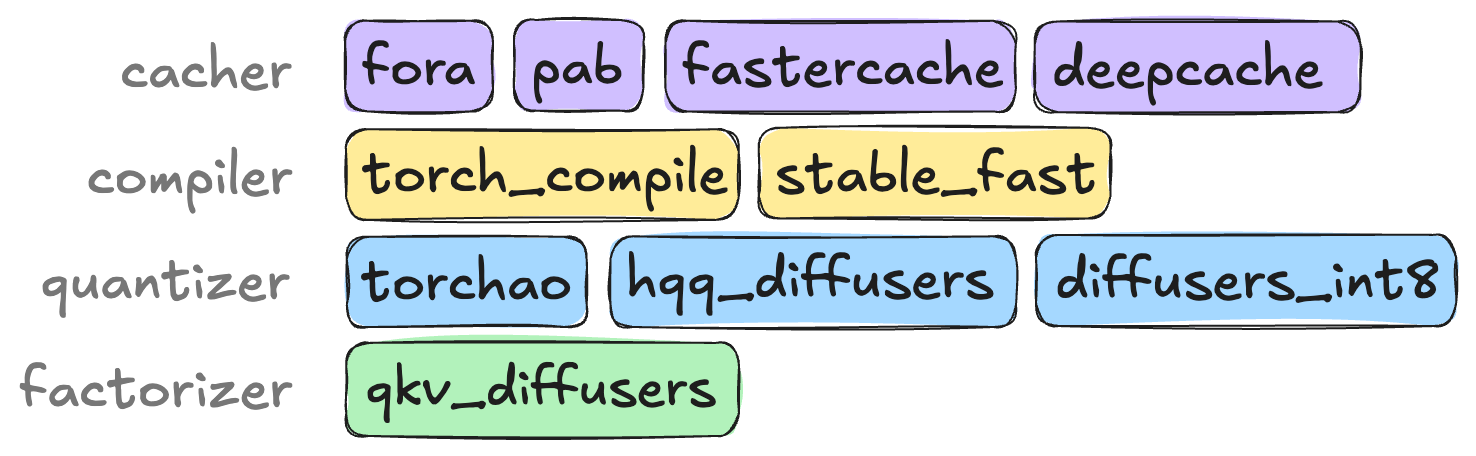
以下の例では、black-forest-labs/FLUX.1-dev を、factorizer、compiler、cacher アルゴリズムの組み合わせで最適化しています。この組み合わせにより、推論が最大 4.2 倍高速化され、GPU メモリのピーク使用量は 34.7GB から 28.0GB に削減されます。なお、出力品質はほぼ同等に保たれます。
この例で使用されている最適化技術の詳細については、Prunaの最適化ドキュメントを参照してください。
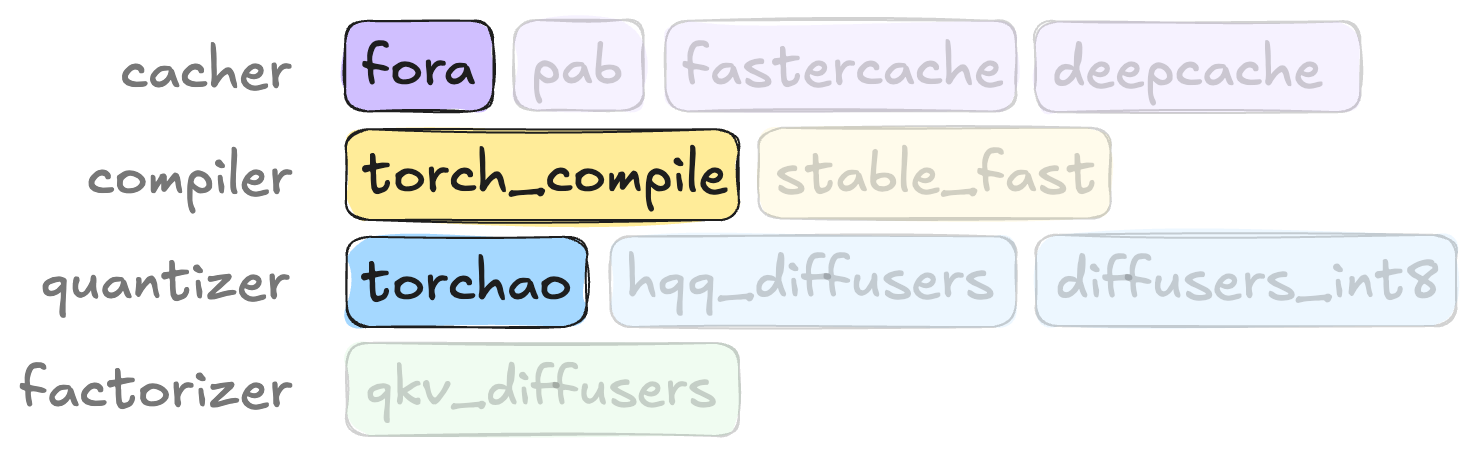
使用する最適化アルゴリズムを指定してSmashConfigを定義することから始めます。モデルを最適化するには、パイプラインとSmashConfigをsmashでラップし、その後、推論のためにパイプラインを通常どおり使用します。
import torch
from diffusers import FluxPipeline

from pruna import PrunaModel, SmashConfig, smash

# load the model
# Try segmind/Segmind-Vega or black-forest-labs/FLUX.1-schnell with a small GPU memory
pipe = FluxPipeline.from_pretrained(
    "black-forest-labs/FLUX.1-dev",
    dtype=torch.bfloat16
).to("cuda")  # or "mps", "xpu", "cpu"

# define the configuration
smash_config = SmashConfig()
smash_config["factorizer"] = "qkv_diffusers"
smash_config["compiler"] = "torch_compile"
smash_config["torch_compile_target"] = "module_list"
smash_config["cacher"] = "fora"
smash_config["fora_interval"] = 2

# for the best results in terms of speed you can add these configs
# however they will increase your warmup time from 1.5 min to 10 min
# smash_config["torch_compile_mode"] = "max-autotune-no-cudagraphs"
# smash_config["quantizer"] = "torchao"
# smash_config["torchao_quant_type"] = "fp8dq"
# smash_config["torchao_excluded_modules"] = "norm+embedding"

# optimize the model
smashed_pipe = smash(pipe, smash_config)

# run the model
smashed_pipe("a knitted purple prune").images[0]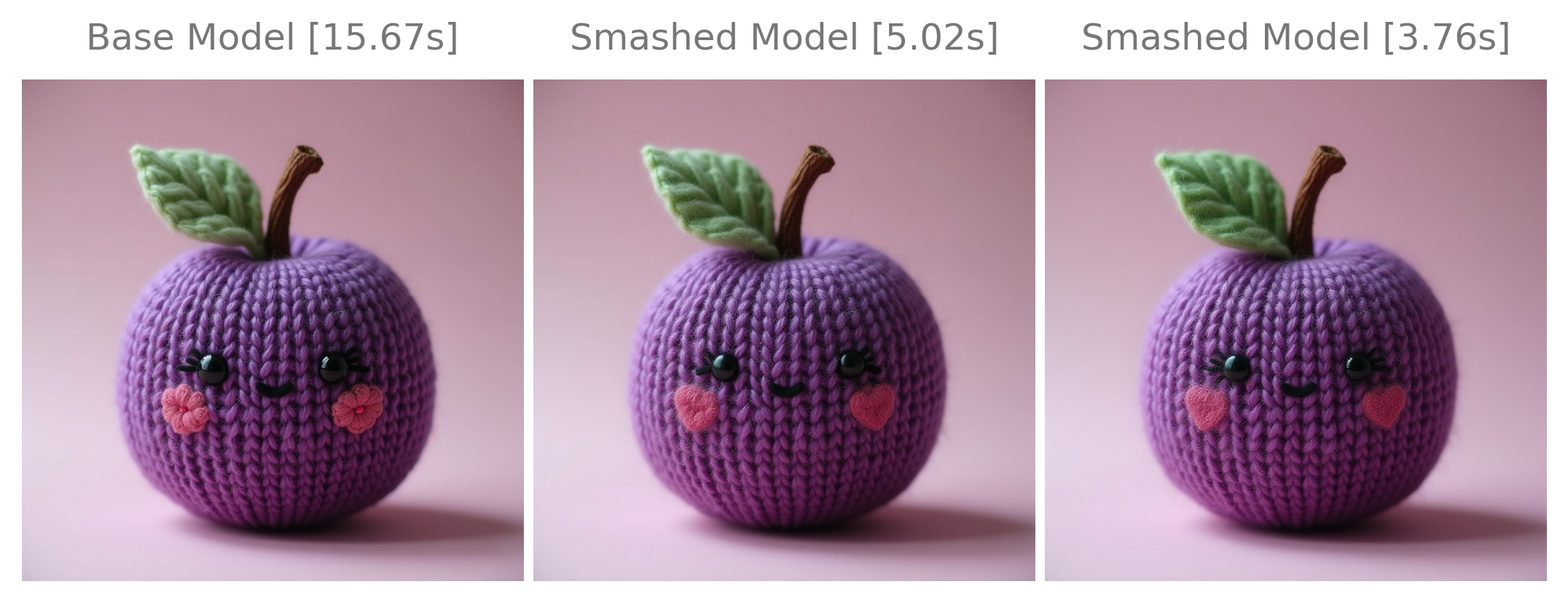
最適化後、Hugging Face Hubを使用して、最適化されたモデルを共有および読み込むことができます。
# save the model
smashed_pipe.save_to_hub("<username>/FLUX.1-dev-smashed")

# load the model
smashed_pipe = PrunaModel.from_hub("<username>/FLUX.1-dev-smashed")
Diffusersモデルの評価とベンチマーク
Pruna は、最適化されたモデルの品質を評価するために EvaluationAgent を提供しています。
総時間やスループットなど、関心のあるメトリクスや、評価に使用するデータセットを指定できます。モデルを定義し、EvaluationAgentに渡すこともできます。
EvaluationAgent を使用して最適化されたモデルを読み込み、評価し、Task に渡すことができます。
import torch
from diffusers import FluxPipeline

from pruna import PrunaModel
from pruna.data.pruna_datamodule import PrunaDataModule
from pruna.evaluation.evaluation_agent import EvaluationAgent
from pruna.evaluation.metrics import (
    ThroughputMetric,
    TorchMetricWrapper,
    TotalTimeMetric,
)
from pruna.evaluation.task import Task

# define the device
device = "cuda" if torch.cuda.is_available() else "mps" if torch.backends.mps.is_available() else "cpu"

# load the model
# Try PrunaAI/Segmind-Vega-smashed or PrunaAI/FLUX.1-dev-smashed with a small GPU memory
smashed_pipe = PrunaModel.from_hub("PrunaAI/FLUX.1-dev-smashed")

# Define the metrics
metrics = [
    TotalTimeMetric(n_iterations=20, n_warmup_iterations=5),
    ThroughputMetric(n_iterations=20, n_warmup_iterations=5),
    TorchMetricWrapper("clip"),
]

# Define the datamodule
datamodule = PrunaDataModule.from_string("LAION256")
datamodule.limit_datasets(10)

# Define the task and evaluation agent
task = Task(metrics, datamodule=datamodule, device=device)
eval_agent = EvaluationAgent(task)

# Evaluate smashed model and offload it to CPU
smashed_pipe.move_to_device(device)
smashed_pipe_results = eval_agent.evaluate(smashed_pipe)
smashed_pipe.move_to_device("cpu")最適化されたモデルをベースモデルと比較する代わりに、単体のdiffusersモデルを評価することもできます。これは、最適化なしのモデルの性能を評価したい場合に便利です。PrunaModelラッパーを使用し、それに対してEvaluationAgentを実行することで、これを行うことができます。
import torch
from diffusers import FluxPipeline

from pruna import PrunaModel

# load the model
# Try PrunaAI/Segmind-Vega-smashed or PrunaAI/FLUX.1-dev-smashed with a small GPU memory
pipe = FluxPipeline.from_pretrained(
    "black-forest-labs/FLUX.1-dev",
    dtype=torch.bfloat16
).to("cpu")
wrapped_pipe = PrunaModel(model=pipe)
モデルの最適化と評価の方法をご覧いただいたので、Pruna を使ってご自身のモデルを最適化し始めることができます。幸いなことに、はじめるための多くの例をご用意しています。
Fluxのベンチマークに関する詳細については、Announcing FLUX-Juiced: The Fastest Image Generation Endpoint (2.6 times faster)! ブログ記事と、InferBench Spaceをご覧ください。