
Diffusers documentation
ParaAttention
ParaAttention


Các mô hình tạo ảnh và video lớn, chẳng hạn như FLUX.1-dev và HunyuanVideo, có thể gây khó khăn cho suy luận trong các ứng dụng thời gian thực và triển khai do kích thước của chúng.
ParaAttention là một thư viện triển khai context parallelism và first block cache, có thể kết hợp với các kỹ thuật khác (torch.compile, fp8 dynamic quantization) để tăng tốc suy luận.
Hướng dẫn này sẽ cho bạn thấy cách áp dụng ParaAttention cho FLUX.1-dev và HunyuanVideo trên GPU NVIDIA L20. Không có tối ưu hóa nào được áp dụng cho benchmark cơ sở của chúng tôi, ngoại trừ HunyuanVideo để tránh lỗi hết bộ nhớ.
Bảng chuẩn cơ sở của chúng tôi cho thấy FLUX.1-dev có thể tạo ra một hình ảnh có độ phân giải 1024x1024 trong 28 bước chỉ với 26,36 giây, và HunyuanVideo có thể tạo ra 129 khung hình ở độ phân giải 720p trong 30 bước với 3675,71 giây.
Để suy luận nhanh hơn nữa với song song ngữ cảnh, hãy thử sử dụng GPU NVIDIA A100 hoặc H100 (nếu có sẵn) hỗ trợ NVLink, đặc biệt khi có số lượng lớn GPU.
Bộ nhớ đệm khối đầu tiên
Việc lưu trữ kết quả đầu ra của các khối transformers trong mô hình và tái sử dụng chúng ở các bước suy luận tiếp theo giúp giảm chi phí tính toán và tăng tốc độ suy luận.
Tuy nhiên, việc quyết định khi nào nên tái sử dụng bộ nhớ đệm để đảm bảo chất lượng của hình ảnh hoặc video được tạo ra là rất khó khăn. ParaAttention trực tiếp sử dụng chênh lệch phần dư của đầu ra khối transformer đầu tiên để xấp xỉ sự khác biệt giữa các đầu ra của mô hình. Khi sự khác biệt đủ nhỏ, chênh lệch phần dư của các bước suy luận trước đó sẽ được tái sử dụng. Nói cách khác, bước khử nhiễu sẽ bị bỏ qua.
Điều này đạt được tốc độ suy luận nhanh gấp đôi trên FLUX.1-dev và HunyuanVideo với chất lượng rất tốt.
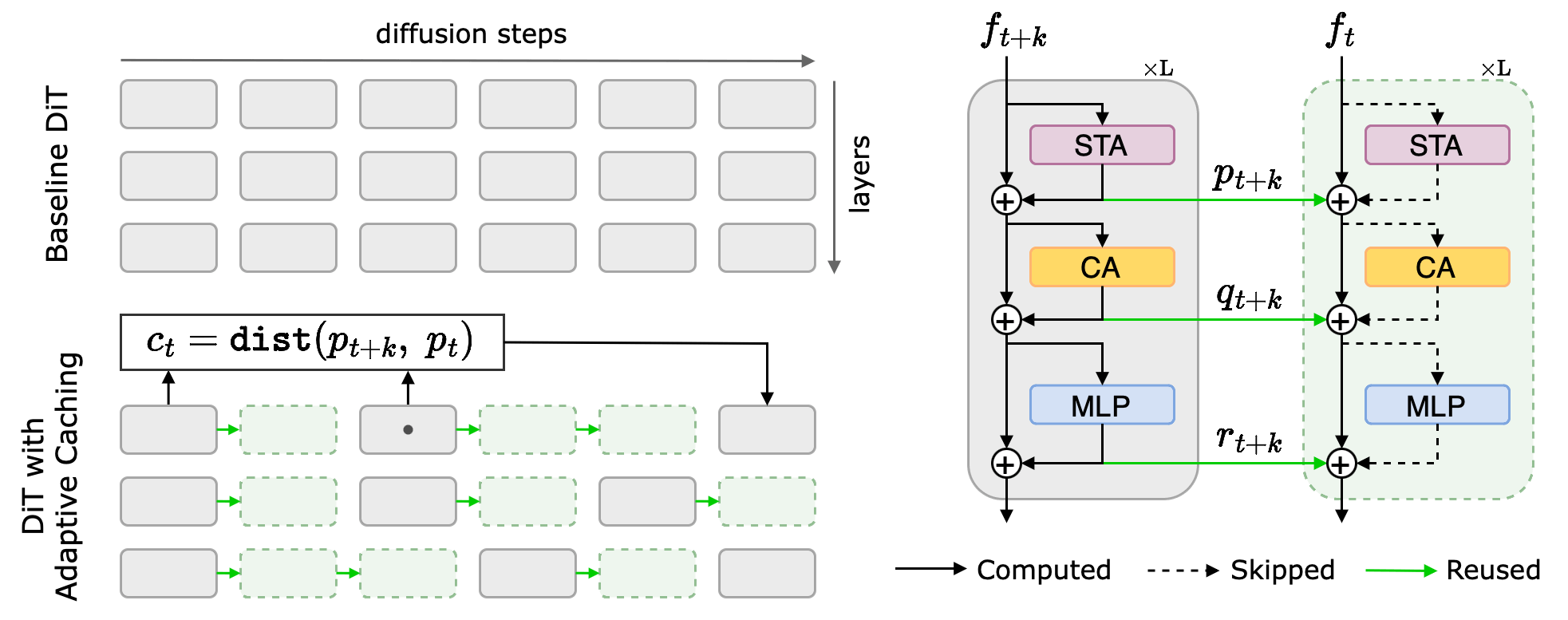
Để áp dụng first block cache trên FLUX.1-dev, hãy gọi apply_cache_on_pipe như minh họa bên dưới. 0.08 là giá trị khác biệt residual mặc định cho các mô hình FLUX.
import time
import torch
from diffusers import FluxPipeline

pipe = FluxPipeline.from_pretrained(
    "black-forest-labs/FLUX.1-dev",
    dtype=torch.bfloat16,
).to("cuda")  # or "mps", "xpu", "cpu"

from para_attn.first_block_cache.diffusers_adapters import apply_cache_on_pipe

apply_cache_on_pipe(pipe, residual_diff_threshold=0.08)

# Enable memory savings
# pipe.enable_model_cpu_offload()
# pipe.enable_sequential_cpu_offload()

begin = time.time()
image = pipe(
    "A cat holding a sign that says hello world",
    num_inference_steps=28,
).images[0]
end = time.time()
print(f"Time: {end - begin:.2f}s")

print("Saving image to flux.png")
image.save("flux.png")| Tối ưu hóa | Bản gốc | FBCache rdt=0.06 | FBCache rdt=0.08 | FBCache rdt=0.10 | FBCache rdt=0.12 |
|---|---|---|---|---|---|
| Xem trước |  |  |  |  |  |
| Thời gian thực (giây) | 26.36 | 21.83 | 17.01 | 16.00 | 13.78 |
First Block Cache đã giảm tốc độ suy luận xuống còn 17,01 giây so với mức cơ sở, tức là nhanh hơn 1,55 lần, trong khi vẫn duy trì mức suy giảm chất lượng gần như bằng không.
Để áp dụng First Block Cache trên HunyuanVideo, hãy sử dụng apply_cache_on_pipe như minh họa bên dưới. 0.06 là giá trị khác biệt phần dư mặc định cho các mô hình HunyuanVideo.
import time
import torch
from diffusers import HunyuanVideoPipeline, HunyuanVideoTransformer3DModel
from diffusers.utils import export_to_video

model_id = "tencent/HunyuanVideo"
transformer = HunyuanVideoTransformer3DModel.from_pretrained(
    model_id,
    subfolder="transformer",
    dtype=torch.bfloat16,
    revision="refs/pr/18",
)
pipe = HunyuanVideoPipeline.from_pretrained(
    model_id,
    transformer=transformer,
    dtype=torch.float16,
    revision="refs/pr/18",
).to("cuda")  # or "mps", "xpu", "cpu"

from para_attn.first_block_cache.diffusers_adapters import apply_cache_on_pipe

apply_cache_on_pipe(pipe, residual_diff_threshold=0.6)

pipe.vae.enable_tiling()

begin = time.time()
output = pipe(
    prompt="A cat walks on the grass, realistic",
    height=720,
    width=1280,
    num_frames=129,
    num_inference_steps=30,
).frames[0]
end = time.time()
print(f"Time: {end - begin:.2f}s")

print("Saving video to hunyuan_video.mp4")
export_to_video(output, "hunyuan_video.mp4", fps=15)First Block Cache đã giảm thời gian suy luận xuống còn 2271.06 giây so với mức cơ sở, tức là nhanh hơn 1,62 lần, trong khi vẫn duy trì mức suy giảm chất lượng gần như bằng không.
lượng tử hóa fp8
fp8 với lượng tử hóa động giúp tăng tốc suy luận và giảm mức sử dụng bộ nhớ. Cả kích hoạt và trọng số đều phải được lượng tử hóa để sử dụng NVIDIA Tensor Cores 8-bit.
Sử dụng float8_weight_only và float8_dynamic_activation_float8_weight để lượng tử hóa mô hình text encoder và transformer.
Phương pháp lượng tử hóa mặc định là lượng tử hóa theo tensor, nhưng nếu GPU của bạn hỗ trợ lượng tử hóa theo hàng, bạn cũng có thể thử phương pháp này để đạt độ chính xác tốt hơn.
Cài đặt torchao bằng lệnh bên dưới.
pip3 install -U torch torchao
torch.compile với mode="max-autotune-no-cudagraphs" hoặc mode="max-autotune" sẽ chọn kernel tối ưu nhất về hiệu năng. Việc biên dịch có thể mất nhiều thời gian nếu đây là lần đầu tiên mô hình được gọi, nhưng điều này xứng đáng sau khi mô hình đã được biên dịch.
Ví dụ này chỉ lượng tử hóa mô hình transformer, nhưng bạn cũng có thể lượng tử hóa text encoder để giảm mức sử dụng bộ nhớ xuống thấp hơn nữa.
Lượng tử hóa động có thể thay đổi đáng kể phân phối của đầu ra mô hình, do đó bạn cần thay đổi
residual_diff_thresholdthành một giá trị lớn hơn để nó có hiệu lực.
import time
import torch
from diffusers import FluxPipeline

pipe = FluxPipeline.from_pretrained(
    "black-forest-labs/FLUX.1-dev",
    dtype=torch.bfloat16,
).to("cuda")  # or "mps", "xpu", "cpu"

from para_attn.first_block_cache.diffusers_adapters import apply_cache_on_pipe

apply_cache_on_pipe(
    pipe,
    residual_diff_threshold=0.12,  # Use a larger value to make the cache take effect
)

from torchao.quantization import quantize_, float8_dynamic_activation_float8_weight, float8_weight_only

quantize_(pipe.text_encoder, float8_weight_only())
quantize_(pipe.transformer, float8_dynamic_activation_float8_weight())
pipe.transformer = torch.compile(
   pipe.transformer, mode="max-autotune-no-cudagraphs",
)

# Enable memory savings
# pipe.enable_model_cpu_offload()
# pipe.enable_sequential_cpu_offload()

for i in range(2):
    begin = time.time()
    image = pipe(
        "A cat holding a sign that says hello world",
        num_inference_steps=28,
    ).images[0]
    end = time.time()
    if i == 0:
        print(f"Warm up time: {end - begin:.2f}s")
    else:
        print(f"Time: {end - begin:.2f}s")

print("Saving image to flux.png")
image.save("flux.png")
fp8 dynamic quantization và torch.compile đã giảm thời gian suy luận xuống còn 7,56 giây so với baseline, tức là nhanh hơn 3,48 lần.
import time
import torch
from diffusers import HunyuanVideoPipeline, HunyuanVideoTransformer3DModel
from diffusers.utils import export_to_video

model_id = "tencent/HunyuanVideo"
transformer = HunyuanVideoTransformer3DModel.from_pretrained(
    model_id,
    subfolder="transformer",
    dtype=torch.bfloat16,
    revision="refs/pr/18",
)
pipe = HunyuanVideoPipeline.from_pretrained(
    model_id,
    transformer=transformer,
    dtype=torch.float16,
    revision="refs/pr/18",
).to("cuda")  # or "mps", "xpu", "cpu"

from para_attn.first_block_cache.diffusers_adapters import apply_cache_on_pipe

apply_cache_on_pipe(pipe)

from torchao.quantization import quantize_, float8_dynamic_activation_float8_weight, float8_weight_only

quantize_(pipe.text_encoder, float8_weight_only())
quantize_(pipe.transformer, float8_dynamic_activation_float8_weight())
pipe.transformer = torch.compile(
   pipe.transformer, mode="max-autotune-no-cudagraphs",
)

# Enable memory savings
pipe.vae.enable_tiling()
# pipe.enable_model_cpu_offload()
# pipe.enable_sequential_cpu_offload()

for i in range(2):
    begin = time.time()
    output = pipe(
        prompt="A cat walks on the grass, realistic",
        height=720,
        width=1280,
        num_frames=129,
        num_inference_steps=1 if i == 0 else 30,
    ).frames[0]
    end = time.time()
    if i == 0:
        print(f"Warm up time: {end - begin:.2f}s")
    else:
        print(f"Time: {end - begin:.2f}s")

print("Saving video to hunyuan_video.mp4")
export_to_video(output, "hunyuan_video.mp4", fps=15)
GPU NVIDIA L20 chỉ có 48GB bộ nhớ và có thể gặp lỗi hết bộ nhớ (OOM) sau khi biên dịch nếu enable_model_cpu_offload không được gọi, vì HunyuanVideo có các tensor kích hoạt rất lớn khi chạy với độ phân giải cao và số lượng khung hình lớn. Đối với các GPU có bộ nhớ dưới 80GB, bạn có thể thử giảm độ phân giải và số lượng khung hình để tránh lỗi OOM.
Các mô hình tạo video lớn thường bị giới hạn bởi các phép tính attention thay vì các lớp fully connected. Những mô hình này không được hưởng lợi đáng kể từ việc lượng tử hóa và torch.compile.
Song song ngữ cảnh
Context Parallelism song song hóa suy luận và mở rộng với nhiều GPU. Thiết kế tổ hợp của ParaAttention cho phép bạn kết hợp Context Parallelism với First Block Cache và lượng tử hóa động.
Tham khảo kho ParaAttention để có hướng dẫn chi tiết và các ví dụ về cách mở rộng suy luận với nhiều GPU.
Nếu quá trình suy luận cần phải duy trì và có khả năng phục vụ, bạn nên sử dụng torch.multiprocessing để tự viết bộ xử lý suy luận. Cách này có thể loại bỏ chi phí khởi tạo tiến trình cũng như tải và biên dịch lại mô hình.
Mẫu mã nguồn dưới đây kết hợp First Block Cache, lượng tử hóa động fp8, torch.compile và Context Parallelism để đạt tốc độ suy luận nhanh nhất.
import time
import torch
import torch.distributed as dist
from diffusers import FluxPipeline

dist.init_process_group()

torch.cuda.set_device(dist.get_rank())

pipe = FluxPipeline.from_pretrained(
    "black-forest-labs/FLUX.1-dev",
    dtype=torch.bfloat16,
).to("cuda")  # or "mps", "xpu", "cpu"

from para_attn.context_parallel import init_context_parallel_mesh
from para_attn.context_parallel.diffusers_adapters import parallelize_pipe
from para_attn.parallel_vae.diffusers_adapters import parallelize_vae

mesh = init_context_parallel_mesh(
    pipe.device.type,
    max_ring_dim_size=2,
)
parallelize_pipe(
    pipe,
    mesh=mesh,
)
parallelize_vae(pipe.vae, mesh=mesh._flatten())

from para_attn.first_block_cache.diffusers_adapters import apply_cache_on_pipe

apply_cache_on_pipe(
    pipe,
    residual_diff_threshold=0.12,  # Use a larger value to make the cache take effect
)

from torchao.quantization import quantize_, float8_dynamic_activation_float8_weight, float8_weight_only

quantize_(pipe.text_encoder, float8_weight_only())
quantize_(pipe.transformer, float8_dynamic_activation_float8_weight())
torch._inductor.config.reorder_for_compute_comm_overlap = True
pipe.transformer = torch.compile(
   pipe.transformer, mode="max-autotune-no-cudagraphs",
)

# Enable memory savings
# pipe.enable_model_cpu_offload(gpu_id=dist.get_rank())
# pipe.enable_sequential_cpu_offload(gpu_id=dist.get_rank())

for i in range(2):
    begin = time.time()
    image = pipe(
        "A cat holding a sign that says hello world",
        num_inference_steps=28,
        output_type="pil" if dist.get_rank() == 0 else "pt",
    ).images[0]
    end = time.time()
    if dist.get_rank() == 0:
        if i == 0:
            print(f"Warm up time: {end - begin:.2f}s")
        else:
            print(f"Time: {end - begin:.2f}s")

if dist.get_rank() == 0:
    print("Saving image to flux.png")
    image.save("flux.png")

dist.destroy_process_group()
Lưu vào run_flux.py và chạy bằng torchrun.
# Use --nproc_per_node to specify the number of GPUs
torchrun --nproc_per_node=2 run_flux.py
Tốc độ suy luận giảm xuống còn 8,20 giây so với mức cơ sở, tức là nhanh hơn 3,21 lần, khi sử dụng 2 GPU NVIDIA L20. Trên 4 GPU L20, tốc độ suy luận là 3,90 giây, tức là nhanh hơn 6,75 lần.
Mẫu mã hóa bên dưới kết hợp First Block Cache và Context Parallelism để đạt tốc độ suy luận nhanh nhất.
import time
import torch
import torch.distributed as dist
from diffusers import HunyuanVideoPipeline, HunyuanVideoTransformer3DModel
from diffusers.utils import export_to_video

dist.init_process_group()

torch.cuda.set_device(dist.get_rank())

model_id = "tencent/HunyuanVideo"
transformer = HunyuanVideoTransformer3DModel.from_pretrained(
    model_id,
    subfolder="transformer",
    dtype=torch.bfloat16,
    revision="refs/pr/18",
)
pipe = HunyuanVideoPipeline.from_pretrained(
    model_id,
    transformer=transformer,
    dtype=torch.float16,
    revision="refs/pr/18",
).to("cuda")  # or "mps", "xpu", "cpu"

from para_attn.context_parallel import init_context_parallel_mesh
from para_attn.context_parallel.diffusers_adapters import parallelize_pipe
from para_attn.parallel_vae.diffusers_adapters import parallelize_vae

mesh = init_context_parallel_mesh(
    pipe.device.type,
)
parallelize_pipe(
    pipe,
    mesh=mesh,
)
parallelize_vae(pipe.vae, mesh=mesh._flatten())

from para_attn.first_block_cache.diffusers_adapters import apply_cache_on_pipe

apply_cache_on_pipe(pipe)

# from torchao.quantization import quantize_, float8_dynamic_activation_float8_weight, float8_weight_only
#
# torch._inductor.config.reorder_for_compute_comm_overlap = True
#
# quantize_(pipe.text_encoder, float8_weight_only())
# quantize_(pipe.transformer, float8_dynamic_activation_float8_weight())
# pipe.transformer = torch.compile(
#    pipe.transformer, mode="max-autotune-no-cudagraphs",
# )

# Enable memory savings
pipe.vae.enable_tiling()
# pipe.enable_model_cpu_offload(gpu_id=dist.get_rank())
# pipe.enable_sequential_cpu_offload(gpu_id=dist.get_rank())

for i in range(2):
    begin = time.time()
    output = pipe(
        prompt="A cat walks on the grass, realistic",
        height=720,
        width=1280,
        num_frames=129,
        num_inference_steps=1 if i == 0 else 30,
        output_type="pil" if dist.get_rank() == 0 else "pt",
    ).frames[0]
    end = time.time()
    if dist.get_rank() == 0:
        if i == 0:
            print(f"Warm up time: {end - begin:.2f}s")
        else:
            print(f"Time: {end - begin:.2f}s")

if dist.get_rank() == 0:
    print("Saving video to hunyuan_video.mp4")
    export_to_video(output, "hunyuan_video.mp4", fps=15)

dist.destroy_process_group()
Lưu vào run_hunyuan_video.py và chạy bằng torchrun.
# Use --nproc_per_node to specify the number of GPUs
torchrun --nproc_per_node=8 run_hunyuan_video.py
Tốc độ suy luận giảm xuống còn 649,23 giây so với mức cơ sở, tức là nhanh hơn 5,66 lần, khi sử dụng 8 GPU NVIDIA L20.
Benchmarks
| Loại GPU | Số lượng GPU | Tối ưu hóa | Thời gian thực (giây) | Tốc độ tăng |
|---|---|---|---|---|
| NVIDIA L20 | 1 | Baseline | 26.36 | 1.00x |
| NVIDIA L20 | 1 | FBCache (rdt=0.08) | 17.01 | 1.55x |
| NVIDIA L20 | 1 | FP8 DQ | 13.40 | 1.96x |
| NVIDIA L20 | 1 | FBCache (rdt=0.12) + FP8 DQ | 7.56 | 3.48x |
| NVIDIA L20 | 2 | FBCache (rdt=0.12) + FP8 DQ + CP | 4.92 | 5.35x |
| NVIDIA L20 | 4 | FBCache (rdt=0.12) + FP8 DQ + CP | 3.90 | 6.75x |
| Loại GPU | Số lượng GPU | Tối ưu hóa | Thời gian thực (giây) | Tốc độ tăng |
|---|---|---|---|---|
| NVIDIA L20 | 1 | Baseline | 3675.71 | 1.00x |
| NVIDIA L20 | 1 | FBCache | 2271.06 | 1.62x |
| NVIDIA L20 | 2 | FBCache + CP | 1132.90 | 3.24x |
| NVIDIA L20 | 4 | FBCache + CP | 718.15 | 5.12x |
| NVIDIA L20 | 8 | FBCache + CP | 649.23 | 5.66x |