

Model Card for Pixel Art SDXL LoRA
A LoRA for Stable Diffusion XL that draws single 16x16-style game sprites on a clean pixel grid. It is designed to be combined with LCM-LoRA so an image takes 6 sampling steps instead of 30.
Model Details
Model Description
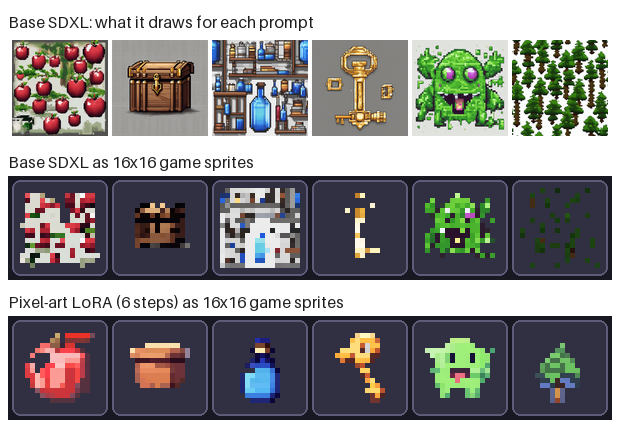
Base SDXL, asked for pixel art, produces detailed "pixel-style" illustrations with uneven squares, soft edges and many colours, often showing several objects. This LoRA adapts SDXL to produce one centred object made of flat square cells, matching the look of a 16x16 sprite upscaled to 1024x1024. Only the LoRA weights are trained; the base model is unchanged.
- Developed by: Abdullah (unsupervised-abdullah)
- Model type: LoRA adapter (rank 32) for the UNet of a latent text-to-image diffusion model
- Language(s) (NLP): English prompts
- License: CreativeML Open RAIL++-M, inherited from the SDXL base model
- Finetuned from model: stabilityai/stable-diffusion-xl-base-1.0
Model Sources
- Repository: github.com/ABDULAH-ab/Pixel-Art
- Demo: A Gradio app (
app.py) is included in the repository
Uses
Direct Use
Generating small game-style sprites of single objects (items, simple creatures, plants) from a text prompt. Use the prompt format the LoRA was trained on:
pxlsprite, pixel art sprite of <subject>, white background
Downstream Use
- Combine with LCM-LoRA for 6-step generation.
- Post-process with the snap-to-grid step from the GitHub repository to get exact 16x16 sprites with a transparent background, ready for use as game assets.
Out-of-Scope Use
- Characters, scenes, tilesets, animation frames and sprites larger than 16x16. The training data contains only small single-object sprites.
- Photorealistic or general-purpose image generation.
- Any use prohibited by the SDXL base model's licence.
Bias, Risks, and Limitations
- Backgrounds are not always white; some come out grey, blue or pink.
- Some subjects are weak, for example swords and donuts.
- Raw outputs are close to the pixel grid but not exactly on it.
- The training sprites are synthetic (AI-generated) and their captions were not reviewed, so the LoRA inherits any errors and stylistic habits of that dataset.
- It also inherits the biases and limitations of the SDXL base model.
- The evaluation uses a small prompt set, so the reported scores are indicative, not precise.
Recommendations
Use the trained prompt format, generate a few seeds per subject and keep the best, and apply the snap-to-grid step before using an output as a game asset. Check outputs by eye; the metrics below do not replace that.
How to Get Started with the Model
import torch
from diffusers import AutoencoderKL, LCMScheduler, StableDiffusionXLPipeline

vae = AutoencoderKL.from_pretrained("madebyollin/sdxl-vae-fp16-fix", torch_dtype=torch.float16)
pipe = StableDiffusionXLPipeline.from_pretrained(
    "stabilityai/stable-diffusion-xl-base-1.0",
    vae=vae,
    torch_dtype=torch.float16,
    variant="fp16",
).to("cuda")

pipe.load_lora_weights(
    "unsupervised-abdullah/pixel-art-sdxl-lora",
    weight_name="pytorch_lora_weights.safetensors",
    adapter_name="pixel",
)
pipe.load_lora_weights("latent-consistency/lcm-lora-sdxl", adapter_name="lcm")
pipe.set_adapters(["pixel", "lcm"], adapter_weights=[1.0, 1.0])
pipe.scheduler = LCMScheduler.from_config(pipe.scheduler.config)

image = pipe(
    "pxlsprite, pixel art sprite of a red apple, white background",
    num_inference_steps=6,
    guidance_scale=1.0,
).images[0]
image.save("apple.png")
For standard sampling, skip the LCM lines and use 30 steps with a guidance scale of 7.
Training Details
Training Data
1000 sprites sampled from Pixel Art Atlas, a CC0 dataset of 1.4M captioned 16x16 synthetic sprites. One sprite was taken per subject so the model learns the style, not a few objects.
Training Procedure
Preprocessing
Each 16x16 transparent sprite was pasted onto a white background and upscaled to 1024x1024 with nearest-neighbour interpolation, so every sprite pixel becomes a sharp 64x64 block. Captions were rewritten as pxlsprite, pixel art sprite of <caption>, white background.
Training Hyperparameters
- Training regime: fp16 mixed precision
- Script: official
diffuserstext-to-image LoRA script for SDXL (UNet only, text encoders frozen) - LoRA rank: 32
- Steps: 3000, batch size 1 (3 passes over the data)
- Learning rate: 1e-4, constant schedule, no warm-up
- Optimiser: 8-bit AdamW
- Loss weighting: Min-SNR, gamma 5.0
- Noise offset: 0.05
- Resolution: 1024x1024
- Seed: 0
Speeds, Sizes, Times
- About 2.35 s per step, roughly 2 hours in total on one NVIDIA T4.
- Weights file: about 186 MB (
pytorch_lora_weights.safetensors).
Evaluation
Testing Data, Factors & Metrics
Testing Data
Nine generations at 1024x1024 from eight short object prompts (apple, treasure chest, potion bottle, key, slime monster, sword, pine tree, donut; the slime prompt is run with two seeds), with fixed seeds shared by every configuration. The prompts are not taken from the training captions.
Factors
Four configurations, each changing one thing: base SDXL at 30 steps; LoRA at 30 steps; LoRA with LCM-LoRA at 6 steps; the same with a tiny VAE decoder (TAESD).
Metrics
- Latency and peak VRAM: seconds per image and highest GPU memory used, after a warm-up run.
- CLIP score: image-text similarity with
openai/clip-vit-base-patch32; higher means the image matches the prompt better. - Grid error: mean absolute difference between the image and a version where each 64x64 cell is replaced by its average colour. 0 is a perfect pixel grid; lower is better.
- Palette size: number of distinct colours after reducing the image to one colour per cell; lower is more sprite-like.
Results
| Config | Steps | Latency (s) | Speed-up | Peak VRAM (GB) | CLIP score | Grid error | Palette size |
|---|---|---|---|---|---|---|---|
| Base SDXL | 30 | 25.48 | 1.0x | 9.5 | 38.5 | 0.1236 | 74 |
| LoRA | 30 | 27.85 | 0.9x | 9.6 | 35.6 | 0.0280 | 46 |
| LoRA + LCM | 6 | 4.57 | 5.6x | 10.0 | 36.3 | 0.0177 | 39 |
| LoRA + LCM + tiny VAE | 6 | 3.79 | 6.7x | 8.1 | 36.2 | 0.0190 | 40 |
Summary
The fastest configuration is 6.7x faster than base SDXL (25.5 s to 3.8 s per image) and cuts grid error by 85%, at a cost of 2.3 CLIP points. Part of the CLIP drop is expected, because a 16x16 sprite carries far less detail for CLIP to recognise than a detailed illustration. Grid error alone can be misleading, since blurry blocks also score well, so it should be read together with CLIP score and the images.
Environmental Impact
- Hardware Type: 1 x NVIDIA T4
- Hours used: about 2 for the final training run
- Cloud Provider: Kaggle Notebooks
- Compute Region: not recorded
- Carbon Emitted: not measured
Technical Specifications
Model Architecture and Objective
Low-rank adapters (rank 32) added to the attention layers of the SDXL UNet. Trained with the standard diffusion noise-prediction objective, with Min-SNR loss weighting and a small noise offset.
Compute Infrastructure
Hardware
One NVIDIA T4 (16 GB) on Kaggle.
Software
PyTorch, diffusers, peft, accelerate and bitsandbytes.
Model Card Authors
Abdullah (unsupervised-abdullah)
Model Card Contact
Open an issue on the GitHub repository or start a discussion in this model's Community tab.
- Downloads last month
- 59
Model tree for unsupervised-abdullah/pixel-art-sdxl-lora
Base model
stabilityai/stable-diffusion-xl-base-1.0